
Getting listed on google maps is so important for getting visible on Google search. The google map result is usually on the first page and appears above the normal (organic) listings. Have a look at these examples below – click on the image and see how the google maps show up either directly below the google ads or on the right hand side. When you search for a term like ‘electrician St Ives, Cornwall, or ‘Film production Cornwall’ like in these examples the first few results will usually be google adverts and you can’t get higher than that. But if a location is in the search term, a google map comes up showing the first 3 results and if you click on the image it shows more results on the map. You really need to be on here and below are some tips on how to get on or get higher on google maps.


So how can your Google Local Business Listing rank higher on Google Maps?
Here’s a list of things you should do.
1. Verify your listing and make sure that your information is correct. If there are two locations or phone numbers listed for one actual business, Google will discredit this. Only make one listing per business entity or per physical business location. If there are 2 businesses running on the same property make sure that you give it a ‘Store Number’ for each to differentiate.
2. Make sure your listing is 100% complete. Enter all the information like opening times, profile pictures, cover pictures and info you can until it says that you are complete.
3. Increase your inbound links from major data providers like yellow pages, yahoo, local chamber website which will list your address. Most good sites will require a fee for a directory listing, but some are free. Having links from other high ranking websites to your website will increase Google’s “trust” in your listing. Google wants to see that your listing information matches other well known and trustworthy sources. They are no longer relying on just the business owner supplied information anymore.
4. Add user reviews. A few good reviews will help you rank higher on Google Maps. Create a landing page on your website that has a direct link to your Google map listing and this is the link you will want people to click to write a review. Ask a few your favorite customers to write a review for you on google maps.
5. Add proper category associations. Make sure that you have chosen the correct category. Search your business and see what category other similar businesses have used.
6. Put your full business address on your website contact page. Make sure your contact page information is up to date and correct. Google will check that your website contact page is consistent with your Google Maps listing information.
7. If you have control over the links to your website, have location keywords in anchor text for inbound links. Instead of it saying “click here” to visit website, have it say “Visit Jabula Stretch Tent, St Ives, Cornwall”.
8. Include keywords in your listing description. Your Google Maps description has to be short (they impose a character limit) but needs to include your keywords. Instead of writing “Jabula Stretch Tents for Events” say something like “Jabula Stretch Tents, Cornwall”.
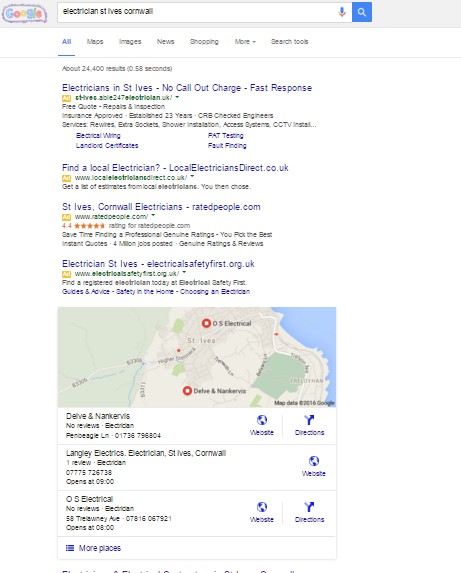
See screen shot to the right another example of a google search on ‘Electricians St Ives Cornwall’ – the first 4 results of paid for google adverts – the very next result is the google maps result. See ‘Langley Electrics’ – that’s one of Seagene’s websites.
Negative factors that might your ranking:
Using an 0800 phone number. Google likes to see local area codes that match your location address.
Having multiple addresses on the contact page. Don’t confuse Google.Have your contact page info be consistent with your Google Maps info.
Negative customer ratings on your reviews. You can’t remove these, but you can bury them with good reviews.
Multiple listings with the same business name. If you are a franchise or have more than one location, identify it with a city, ex: Holiday Inn Daytona Beach instead of naming it Holiday Inn.
Multiple listings with the same address or phone number – be sure to add a Store or Business number.
Google is much more advanced than we will ever know. There is a reason they do not release their formula for ranking websites and Google Map listings: they are trying to prevent people from unfairly ranking. I am always researching and testing the best ways to optimize websites for search engines and will pass this knowledge onto our clients. Best of luck and ask me for help if you’re having any problems.